Instructions to use QuantFactory/Qwen2.5-Math-7B-Instruct-GGUF with libraries, inference providers, notebooks, and local apps. Follow these links to get started.
- Libraries
- Transformers
How to use QuantFactory/Qwen2.5-Math-7B-Instruct-GGUF with Transformers:
# Use a pipeline as a high-level helper from transformers import pipeline pipe = pipeline("text-generation", model="QuantFactory/Qwen2.5-Math-7B-Instruct-GGUF") messages = [ {"role": "user", "content": "Who are you?"}, ] pipe(messages)# Load model directly from transformers import AutoModel model = AutoModel.from_pretrained("QuantFactory/Qwen2.5-Math-7B-Instruct-GGUF", dtype="auto") - llama-cpp-python
How to use QuantFactory/Qwen2.5-Math-7B-Instruct-GGUF with llama-cpp-python:
# !pip install llama-cpp-python from llama_cpp import Llama llm = Llama.from_pretrained( repo_id="QuantFactory/Qwen2.5-Math-7B-Instruct-GGUF", filename="Qwen2.5-Math-7B-Instruct.Q2_K.gguf", )
llm.create_chat_completion( messages = [ { "role": "user", "content": "What is the capital of France?" } ] ) - Notebooks
- Google Colab
- Kaggle
- Local Apps
- llama.cpp
How to use QuantFactory/Qwen2.5-Math-7B-Instruct-GGUF with llama.cpp:
Install from brew
brew install llama.cpp # Start a local OpenAI-compatible server with a web UI: llama-server -hf QuantFactory/Qwen2.5-Math-7B-Instruct-GGUF:Q4_K_M # Run inference directly in the terminal: llama-cli -hf QuantFactory/Qwen2.5-Math-7B-Instruct-GGUF:Q4_K_M
Install from WinGet (Windows)
winget install llama.cpp # Start a local OpenAI-compatible server with a web UI: llama-server -hf QuantFactory/Qwen2.5-Math-7B-Instruct-GGUF:Q4_K_M # Run inference directly in the terminal: llama-cli -hf QuantFactory/Qwen2.5-Math-7B-Instruct-GGUF:Q4_K_M
Use pre-built binary
# Download pre-built binary from: # https://github.com/ggerganov/llama.cpp/releases # Start a local OpenAI-compatible server with a web UI: ./llama-server -hf QuantFactory/Qwen2.5-Math-7B-Instruct-GGUF:Q4_K_M # Run inference directly in the terminal: ./llama-cli -hf QuantFactory/Qwen2.5-Math-7B-Instruct-GGUF:Q4_K_M
Build from source code
git clone https://github.com/ggerganov/llama.cpp.git cd llama.cpp cmake -B build cmake --build build -j --target llama-server llama-cli # Start a local OpenAI-compatible server with a web UI: ./build/bin/llama-server -hf QuantFactory/Qwen2.5-Math-7B-Instruct-GGUF:Q4_K_M # Run inference directly in the terminal: ./build/bin/llama-cli -hf QuantFactory/Qwen2.5-Math-7B-Instruct-GGUF:Q4_K_M
Use Docker
docker model run hf.co/QuantFactory/Qwen2.5-Math-7B-Instruct-GGUF:Q4_K_M
- LM Studio
- Jan
- vLLM
How to use QuantFactory/Qwen2.5-Math-7B-Instruct-GGUF with vLLM:
Install from pip and serve model
# Install vLLM from pip: pip install vllm # Start the vLLM server: vllm serve "QuantFactory/Qwen2.5-Math-7B-Instruct-GGUF" # Call the server using curl (OpenAI-compatible API): curl -X POST "http://localhost:8000/v1/chat/completions" \ -H "Content-Type: application/json" \ --data '{ "model": "QuantFactory/Qwen2.5-Math-7B-Instruct-GGUF", "messages": [ { "role": "user", "content": "What is the capital of France?" } ] }'Use Docker
docker model run hf.co/QuantFactory/Qwen2.5-Math-7B-Instruct-GGUF:Q4_K_M
- SGLang
How to use QuantFactory/Qwen2.5-Math-7B-Instruct-GGUF with SGLang:
Install from pip and serve model
# Install SGLang from pip: pip install sglang # Start the SGLang server: python3 -m sglang.launch_server \ --model-path "QuantFactory/Qwen2.5-Math-7B-Instruct-GGUF" \ --host 0.0.0.0 \ --port 30000 # Call the server using curl (OpenAI-compatible API): curl -X POST "http://localhost:30000/v1/chat/completions" \ -H "Content-Type: application/json" \ --data '{ "model": "QuantFactory/Qwen2.5-Math-7B-Instruct-GGUF", "messages": [ { "role": "user", "content": "What is the capital of France?" } ] }'Use Docker images
docker run --gpus all \ --shm-size 32g \ -p 30000:30000 \ -v ~/.cache/huggingface:/root/.cache/huggingface \ --env "HF_TOKEN=<secret>" \ --ipc=host \ lmsysorg/sglang:latest \ python3 -m sglang.launch_server \ --model-path "QuantFactory/Qwen2.5-Math-7B-Instruct-GGUF" \ --host 0.0.0.0 \ --port 30000 # Call the server using curl (OpenAI-compatible API): curl -X POST "http://localhost:30000/v1/chat/completions" \ -H "Content-Type: application/json" \ --data '{ "model": "QuantFactory/Qwen2.5-Math-7B-Instruct-GGUF", "messages": [ { "role": "user", "content": "What is the capital of France?" } ] }' - Ollama
How to use QuantFactory/Qwen2.5-Math-7B-Instruct-GGUF with Ollama:
ollama run hf.co/QuantFactory/Qwen2.5-Math-7B-Instruct-GGUF:Q4_K_M
- Unsloth Studio new
How to use QuantFactory/Qwen2.5-Math-7B-Instruct-GGUF with Unsloth Studio:
Install Unsloth Studio (macOS, Linux, WSL)
curl -fsSL https://unsloth.ai/install.sh | sh # Run unsloth studio unsloth studio -H 0.0.0.0 -p 8888 # Then open http://localhost:8888 in your browser # Search for QuantFactory/Qwen2.5-Math-7B-Instruct-GGUF to start chatting
Install Unsloth Studio (Windows)
irm https://unsloth.ai/install.ps1 | iex # Run unsloth studio unsloth studio -H 0.0.0.0 -p 8888 # Then open http://localhost:8888 in your browser # Search for QuantFactory/Qwen2.5-Math-7B-Instruct-GGUF to start chatting
Using HuggingFace Spaces for Unsloth
# No setup required # Open https://huggingface.co/spaces/unsloth/studio in your browser # Search for QuantFactory/Qwen2.5-Math-7B-Instruct-GGUF to start chatting
- Pi new
How to use QuantFactory/Qwen2.5-Math-7B-Instruct-GGUF with Pi:
Start the llama.cpp server
# Install llama.cpp: brew install llama.cpp # Start a local OpenAI-compatible server: llama-server -hf QuantFactory/Qwen2.5-Math-7B-Instruct-GGUF:Q4_K_M
Configure the model in Pi
# Install Pi: npm install -g @mariozechner/pi-coding-agent # Add to ~/.pi/agent/models.json: { "providers": { "llama-cpp": { "baseUrl": "http://localhost:8080/v1", "api": "openai-completions", "apiKey": "none", "models": [ { "id": "QuantFactory/Qwen2.5-Math-7B-Instruct-GGUF:Q4_K_M" } ] } } }Run Pi
# Start Pi in your project directory: pi
- Hermes Agent new
How to use QuantFactory/Qwen2.5-Math-7B-Instruct-GGUF with Hermes Agent:
Start the llama.cpp server
# Install llama.cpp: brew install llama.cpp # Start a local OpenAI-compatible server: llama-server -hf QuantFactory/Qwen2.5-Math-7B-Instruct-GGUF:Q4_K_M
Configure Hermes
# Install Hermes: curl -fsSL https://hermes-agent.nousresearch.com/install.sh | bash hermes setup # Point Hermes at the local server: hermes config set model.provider custom hermes config set model.base_url http://127.0.0.1:8080/v1 hermes config set model.default QuantFactory/Qwen2.5-Math-7B-Instruct-GGUF:Q4_K_M
Run Hermes
hermes
- Docker Model Runner
How to use QuantFactory/Qwen2.5-Math-7B-Instruct-GGUF with Docker Model Runner:
docker model run hf.co/QuantFactory/Qwen2.5-Math-7B-Instruct-GGUF:Q4_K_M
- Lemonade
How to use QuantFactory/Qwen2.5-Math-7B-Instruct-GGUF with Lemonade:
Pull the model
# Download Lemonade from https://lemonade-server.ai/ lemonade pull QuantFactory/Qwen2.5-Math-7B-Instruct-GGUF:Q4_K_M
Run and chat with the model
lemonade run user.Qwen2.5-Math-7B-Instruct-GGUF-Q4_K_M
List all available models
lemonade list
| base_model: Qwen/Qwen2.5-Math-7B | |
| language: | |
| - en | |
| pipeline_tag: text-generation | |
| tags: | |
| - chat | |
| library_name: transformers | |
| license: apache-2.0 | |
| license_link: https://huggingface.co/Qwen/Qwen2.5-Math-7B-Instruct/blob/main/LICENSE | |
| [](https://hf.co/QuantFactory) | |
| # QuantFactory/Qwen2.5-Math-7B-Instruct-GGUF | |
| This is quantized version of [Qwen/Qwen2.5-Math-7B-Instruct](https://huggingface.co/Qwen/Qwen2.5-Math-7B-Instruct) created using llama.cpp | |
| # Original Model Card | |
| # Qwen2.5-Math-7B-Instruct | |
| > [!Warning] | |
| > <div align="center"> | |
| > <b> | |
| > 🚨 Qwen2.5-Math mainly supports solving English and Chinese math problems through CoT and TIR. We do not recommend using this series of models for other tasks. | |
| > </b> | |
| > </div> | |
| ## Introduction | |
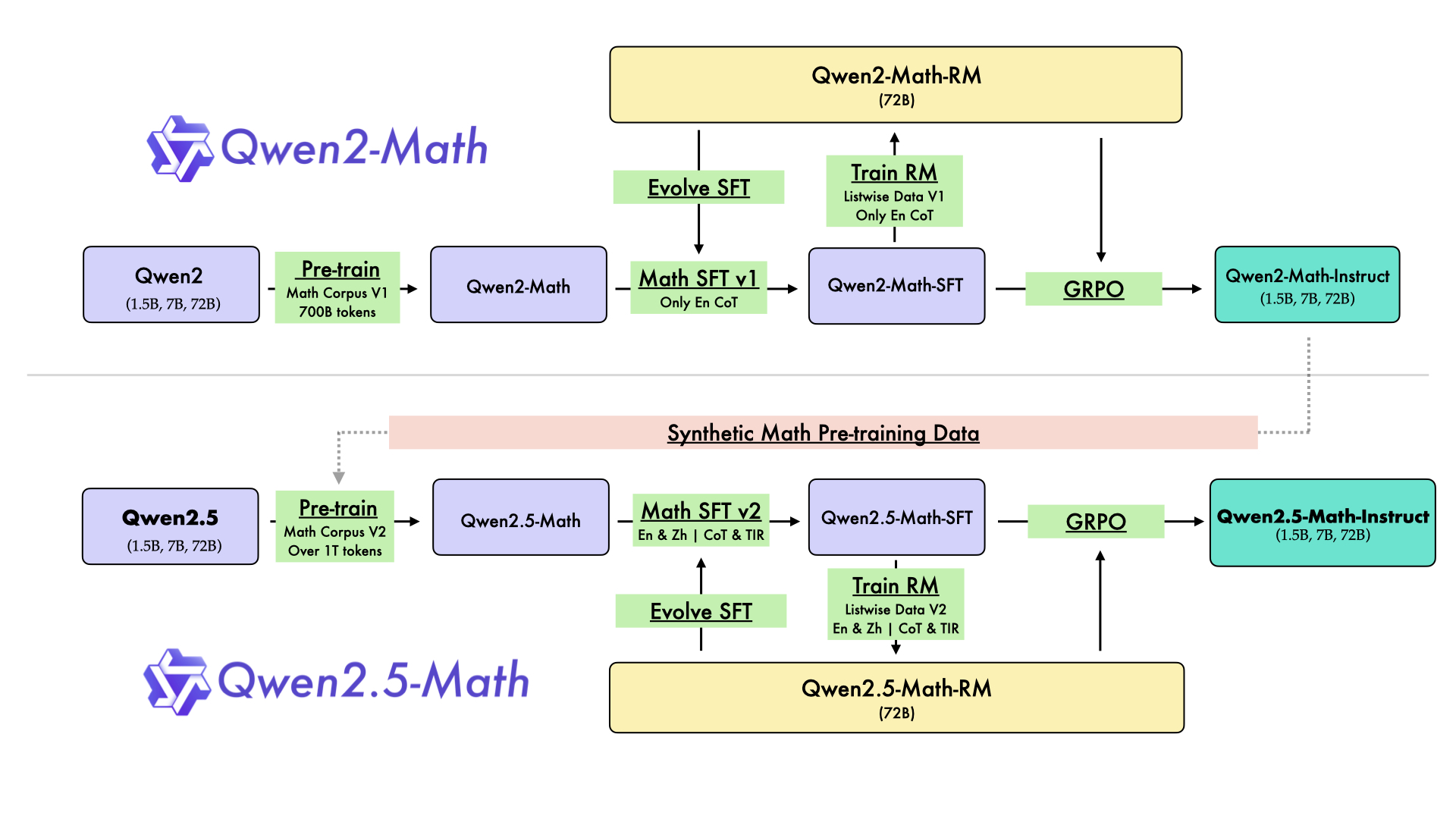
| In August 2024, we released the first series of mathematical LLMs - [Qwen2-Math](https://qwenlm.github.io/blog/qwen2-math/) - of our Qwen family. A month later, we have upgraded it and open-sourced **Qwen2.5-Math** series, including base models **Qwen2.5-Math-1.5B/7B/72B**, instruction-tuned models **Qwen2.5-Math-1.5B/7B/72B-Instruct**, and mathematical reward model **Qwen2.5-Math-RM-72B**. | |
| Unlike Qwen2-Math series which only supports using Chain-of-Thught (CoT) to solve English math problems, Qwen2.5-Math series is expanded to support using both CoT and Tool-integrated Reasoning (TIR) to solve math problems in both Chinese and English. The Qwen2.5-Math series models have achieved significant performance improvements compared to the Qwen2-Math series models on the Chinese and English mathematics benchmarks with CoT. | |
|  | |
| While CoT plays a vital role in enhancing the reasoning capabilities of LLMs, it faces challenges in achieving computational accuracy and handling complex mathematical or algorithmic reasoning tasks, such as finding the roots of a quadratic equation or computing the eigenvalues of a matrix. TIR can further improve the model's proficiency in precise computation, symbolic manipulation, and algorithmic manipulation. Qwen2.5-Math-1.5B/7B/72B-Instruct achieve 79.7, 85.3, and 87.8 respectively on the MATH benchmark using TIR. | |
| ## Model Details | |
| For more details, please refer to our [blog post](https://qwenlm.github.io/blog/qwen2.5-math/) and [GitHub repo](https://github.com/QwenLM/Qwen2.5-Math). | |
| ## Requirements | |
| * `transformers>=4.37.0` for Qwen2.5-Math models. The latest version is recommended. | |
| > [!Warning] | |
| > <div align="center"> | |
| > <b> | |
| > 🚨 This is a must because <code>transformers</code> integrated Qwen2 codes since <code>4.37.0</code>. | |
| > </b> | |
| > </div> | |
| For requirements on GPU memory and the respective throughput, see similar results of Qwen2 [here](https://qwen.readthedocs.io/en/latest/benchmark/speed_benchmark.html). | |
| ## Quick Start | |
| > [!Important] | |
| > | |
| > **Qwen2.5-Math-7B-Instruct** is an instruction model for chatting; | |
| > | |
| > **Qwen2.5-Math-7B** is a base model typically used for completion and few-shot inference, serving as a better starting point for fine-tuning. | |
| > | |
| ### 🤗 Hugging Face Transformers | |
| Qwen2.5-Math can be deployed and infered in the same way as [Qwen2.5](https://github.com/QwenLM/Qwen2.5). Here we show a code snippet to show you how to use the chat model with `transformers`: | |
| ```python | |
| from transformers import AutoModelForCausalLM, AutoTokenizer | |
| model_name = "Qwen/Qwen2.5-Math-7B-Instruct" | |
| device = "cuda" # the device to load the model onto | |
| model = AutoModelForCausalLM.from_pretrained( | |
| model_name, | |
| torch_dtype="auto", | |
| device_map="auto" | |
| ) | |
| tokenizer = AutoTokenizer.from_pretrained(model_name) | |
| prompt = "Find the value of $x$ that satisfies the equation $4x+5 = 6x+7$." | |
| # CoT | |
| messages = [ | |
| {"role": "system", "content": "Please reason step by step, and put your final answer within \\boxed{}."}, | |
| {"role": "user", "content": prompt} | |
| ] | |
| # TIR | |
| messages = [ | |
| {"role": "system", "content": "Please integrate natural language reasoning with programs to solve the problem above, and put your final answer within \\boxed{}."}, | |
| {"role": "user", "content": prompt} | |
| ] | |
| text = tokenizer.apply_chat_template( | |
| messages, | |
| tokenize=False, | |
| add_generation_prompt=True | |
| ) | |
| model_inputs = tokenizer([text], return_tensors="pt").to(device) | |
| generated_ids = model.generate( | |
| **model_inputs, | |
| max_new_tokens=512 | |
| ) | |
| generated_ids = [ | |
| output_ids[len(input_ids):] for input_ids, output_ids in zip(model_inputs.input_ids, generated_ids) | |
| ] | |
| response = tokenizer.batch_decode(generated_ids, skip_special_tokens=True)[0] | |
| ``` | |
| ## Citation | |
| If you find our work helpful, feel free to give us a citation. | |
| ``` | |
| @article{yang2024qwen2, | |
| title={Qwen2 technical report}, | |
| author={Yang, An and Yang, Baosong and Hui, Binyuan and Zheng, Bo and Yu, Bowen and Zhou, Chang and Li, Chengpeng and Li, Chengyuan and Liu, Dayiheng and Huang, Fei and others}, | |
| journal={arXiv preprint arXiv:2407.10671}, | |
| year={2024} | |
| } | |
| ``` | |


