| --- |
| language: en |
| license: mit |
| tags: |
| - vision |
| - video-classification |
| model-index: |
| - name: nielsr/xclip-base-patch16-16-frames |
| results: |
| - task: |
| type: video-classification |
| dataset: |
| name: Kinetics 400 |
| type: kinetics-400 |
| metrics: |
| - type: top-1 accuracy |
| value: 84.7 |
| - type: top-5 accuracy |
| value: 96.8 |
| --- |
| |
| # X-CLIP (base-sized model) |
|
|
| X-CLIP model (base-sized, patch resolution of 16) trained fully-supervised on [Kinetics-400](https://www.deepmind.com/open-source/kinetics). It was introduced in the paper [Expanding Language-Image Pretrained Models for General Video Recognition](https://arxiv.org/abs/2208.02816) by Ni et al. and first released in [this repository](https://github.com/microsoft/VideoX/tree/master/X-CLIP). |
|
|
| This model was trained using 16 frames per video, at a resolution of 224x224. |
|
|
| Disclaimer: The team releasing X-CLIP did not write a model card for this model so this model card has been written by the Hugging Face team. |
|
|
| ## Model description |
|
|
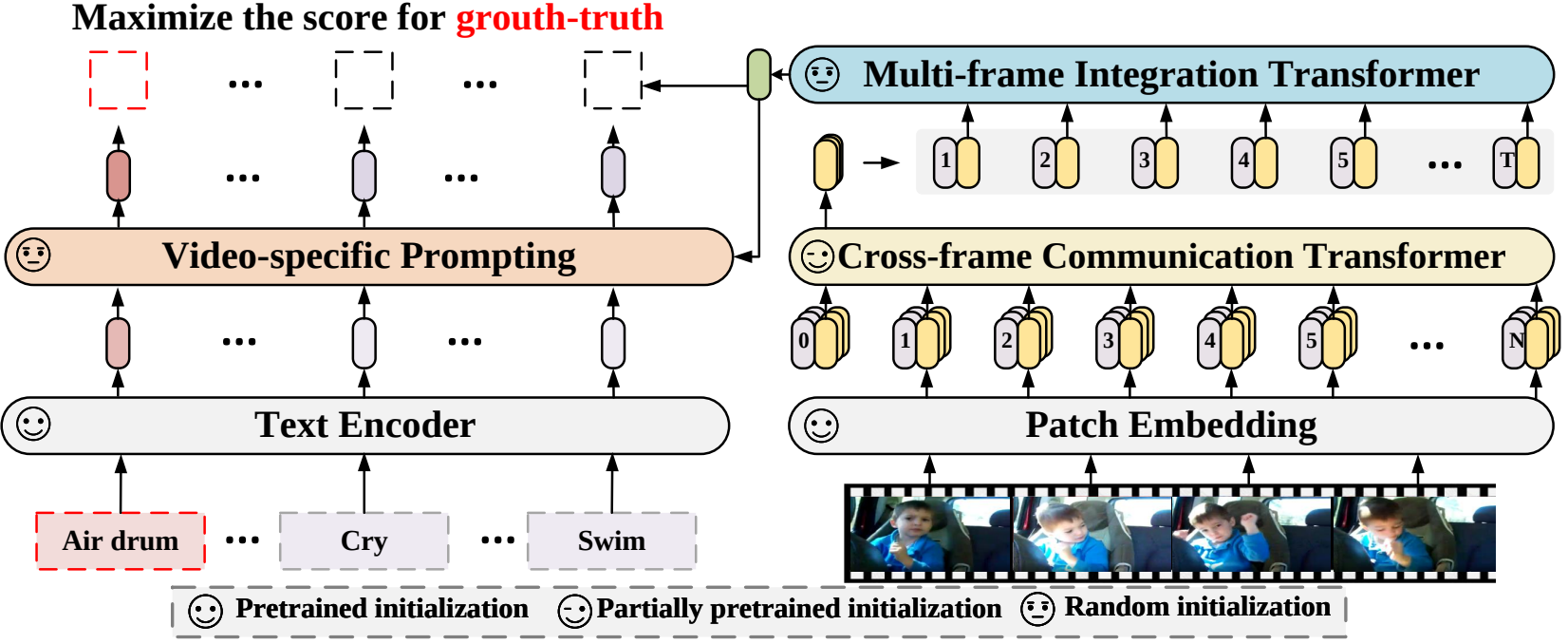
| X-CLIP is a minimal extension of [CLIP](https://huggingface.co/docs/transformers/model_doc/clip) for general video-language understanding. The model is trained in a contrastive way on (video, text) pairs. |
|
|
|  |
|
|
| This allows the model to be used for tasks like zero-shot, few-shot or fully supervised video classification and video-text retrieval. |
|
|
| ## Intended uses & limitations |
|
|
| You can use the raw model for determining how well text goes with a given video. See the [model hub](https://huggingface.co/models?search=microsoft/xclip) to look for |
| fine-tuned versions on a task that interests you. |
|
|
| ### How to use |
|
|
| For code examples, we refer to the [documentation](https://huggingface.co/transformers/main/model_doc/xclip.html#). |
|
|
| ## Training data |
|
|
| This model was trained on [Kinetics-400](https://www.deepmind.com/open-source/kinetics). |
|
|
| ### Preprocessing |
|
|
| The exact details of preprocessing during training can be found [here](https://github.com/microsoft/VideoX/blob/40f6d177e0a057a50ac69ac1de6b5938fd268601/X-CLIP/datasets/build.py#L247). |
|
|
| The exact details of preprocessing during validation can be found [here](https://github.com/microsoft/VideoX/blob/40f6d177e0a057a50ac69ac1de6b5938fd268601/X-CLIP/datasets/build.py#L285). |
|
|
| During validation, one resizes the shorter edge of each frame, after which center cropping is performed to a fixed-size resolution (like 224x224). Next, frames are normalized across the RGB channels with the ImageNet mean and standard deviation. |
|
|
| ## Evaluation results |
|
|
| This model achieves a top-1 accuracy of 84.7% and a top-5 accuracy of 96.8%. |
|
|


